Control Widgets
Interactive input controls: Button, Switch, Slider, TextField, Checkbox, RadioButton, SegmentedControl.
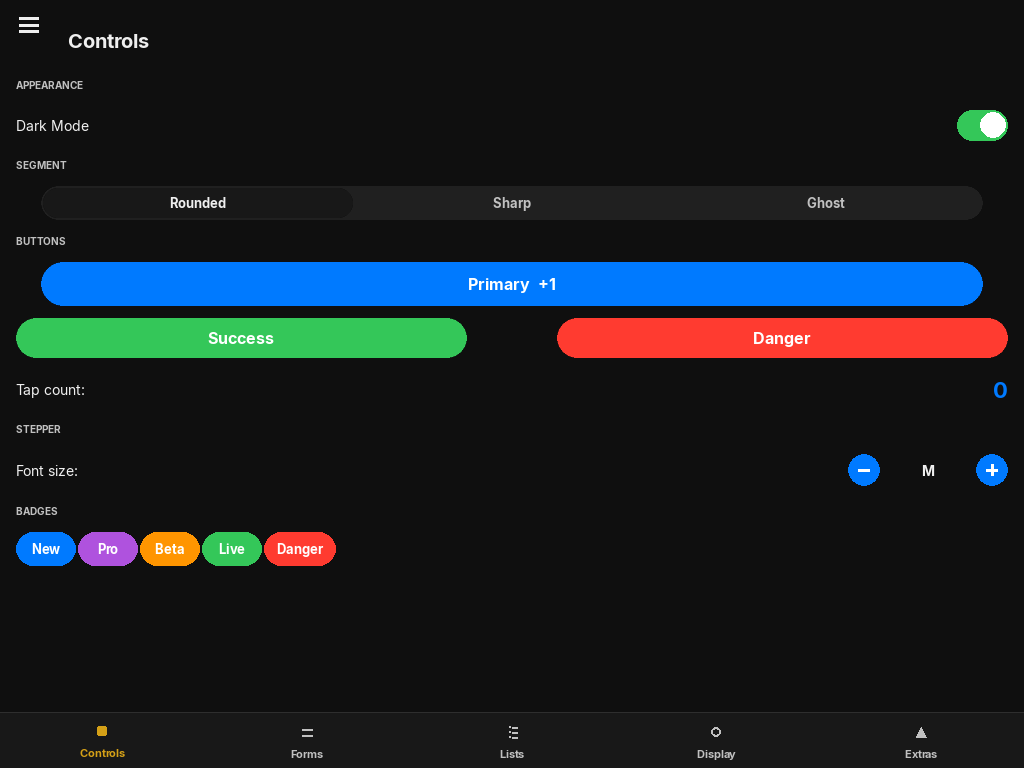
Button
Button(
    text: str,
    on_click: Callable[[], None] | None = None,
    anchor="top_left", x=0, y=0, width=160, height=44,
    background_color=None,   # defaults to iOSTheme.accent
    text_color=None,         # defaults to white
    border_radius=-1,        # -1 = fully rounded pill
    font_size=16,
    font_name="Arial",
)
Scales to 0.92 on press and returns to 1.0 with a spring. border_radius=-1 produces a fully rounded pill shape.
from pylay import Button, ColorPalette

btn = Button("Save", on_click=lambda: save(),
             background_color=ColorPalette.GREEN,
             anchor="bottom_right", x=20, y=20, width=120, height=44)
Switch
Switch(
    value: bool | State = False,
    on_change: Callable[[bool], None] | None = None,
    anchor="top_left", x=0, y=0, width=51, height=31,
    active_color=None,   # defaults to ColorPalette.GREEN
)
iOS-style toggle. The track and knob position animate via spring. Accepts a State for value — the switch both reflects and updates the state.
dark = State(True)
Switch(value=dark, on_change=lambda v: app.apply_theme(v), ...)
Slider
Slider(
    value: float | State = 0.5,
    min_val=0.0, max_val=1.0,
    on_change: Callable[[float], None] | None = None,
    anchor="top_left", x=0, y=0, width=150, height=28,
    active_color=None,   # defaults to ColorPalette.BLUE
)
Horizontal slider. Track becomes thicker and knob enlarges on hover via spring animations. Value is clamped to [min_val, max_val].
vol = State(0.75)
Slider(value=vol, on_change=lambda v: audio.set_volume(v),
       anchor="top_left", x=0, y=0, width=1.0, height=30)
TextField
TextField(
    text: str | State = "",
    placeholder="Enter text...",
    on_change: Callable[[str], None] | None = None,
    anchor="top_left", x=0, y=0, width=200, height=44,
    font_size=15,
)
Single-line text input. Supports full keyboard input, cursor positioning, and selection. A spring-driven focus ring expands around the field when active.
name = State("")
TextField(text=name, placeholder="Player name",
          on_change=lambda v: prefs.set("name", v),
          anchor="top_left", x=0, y=0, width=1.0, height=44)
Checkbox
Checkbox(
    value: bool | State = False,
    on_change: Callable[[bool], None] | None = None,
    anchor="top_left", x=0, y=0, size=24,
    active_color=None,   # defaults to ColorPalette.GREEN
)
Square checkbox. The checkmark pops in with a spring-scale animation on activation.
RadioButton
RadioButton(
    group_state: State,     # shared State for all buttons in the group
    choice_value: Any,      # this button's value
    on_change: Callable[[Any], None] | None = None,
    anchor="top_left", x=0, y=0, size=24,
    active_color=None,
)
Multiple RadioButtons share a single State. Selecting one updates the shared state to that button's choice_value and deselects all others.
lang = State("en")

rb_en = RadioButton(lang, "en", anchor="top_left", x=0, y=0, size=22)
rb_de = RadioButton(lang, "de", anchor="top_left", x=0, y=36, size=22)
rb_fr = RadioButton(lang, "fr", anchor="top_left", x=0, y=72, size=22)

# When rb_de is clicked: lang.value == "de", rb_en and rb_fr deselect
SegmentedControl
SegmentedControl(
    segments: list[str],
    selected_index: int | State = 0,
    on_change: Callable[[int], None] | None = None,
    anchor="top_left", x=0, y=0, width=300, height=36,
)
Tab bar with a spring-animated sliding selection pill. Use for switching between views without navigating to a new screen.
tab = State(0)
ctrl = SegmentedControl(
    segments=["Notes", "Rests", "Chords"],
    selected_index=tab,
    on_change=lambda i: show_panel(i),
    anchor="top_left", x=0, y=0, width=1.0, height=36,
)
Stepper
Stepper(
    options: list[Any],
    value: Any = None,              # initial value; defaults to options[0]
    fmt_fn: Callable[[Any], str] | None = None,  # how to display the value
    on_change: Callable[[Any], None] | None = None,
    label_suffix: str = "",         # appended to the displayed value
    active_color: pygame.Color | None = None,
    width=160, height=36,
)
Minus / value / plus control for stepping through a list of options. Renders two circular buttons with spring-animated press feedback. The displayed text is fmt_fn(value) + label_suffix.
bpm = Stepper(
    options=list(range(40, 241, 5)),
    value=120,
    label_suffix=" BPM",
    on_change=lambda v: set_bpm(v),
    anchor="top_left", x=0, y=0, width=180, height=36,
)

# Custom formatter
difficulty = Stepper(
    options=["easy", "medium", "hard"],
    value="medium",
    fmt_fn=lambda v: v.capitalize(),
    on_change=lambda v: set_difficulty(v),
    anchor="top_left", x=0, y=0, width=200, height=36,
)Read-only property returning the currently selected option.